A DayZ server that crashes on startup or refuses players often has an inconsistent mod list: a duplicate, a dependency loaded too late, or a mod missing on the client. The mod checker analyzes these cases in seconds.
How to use the tool
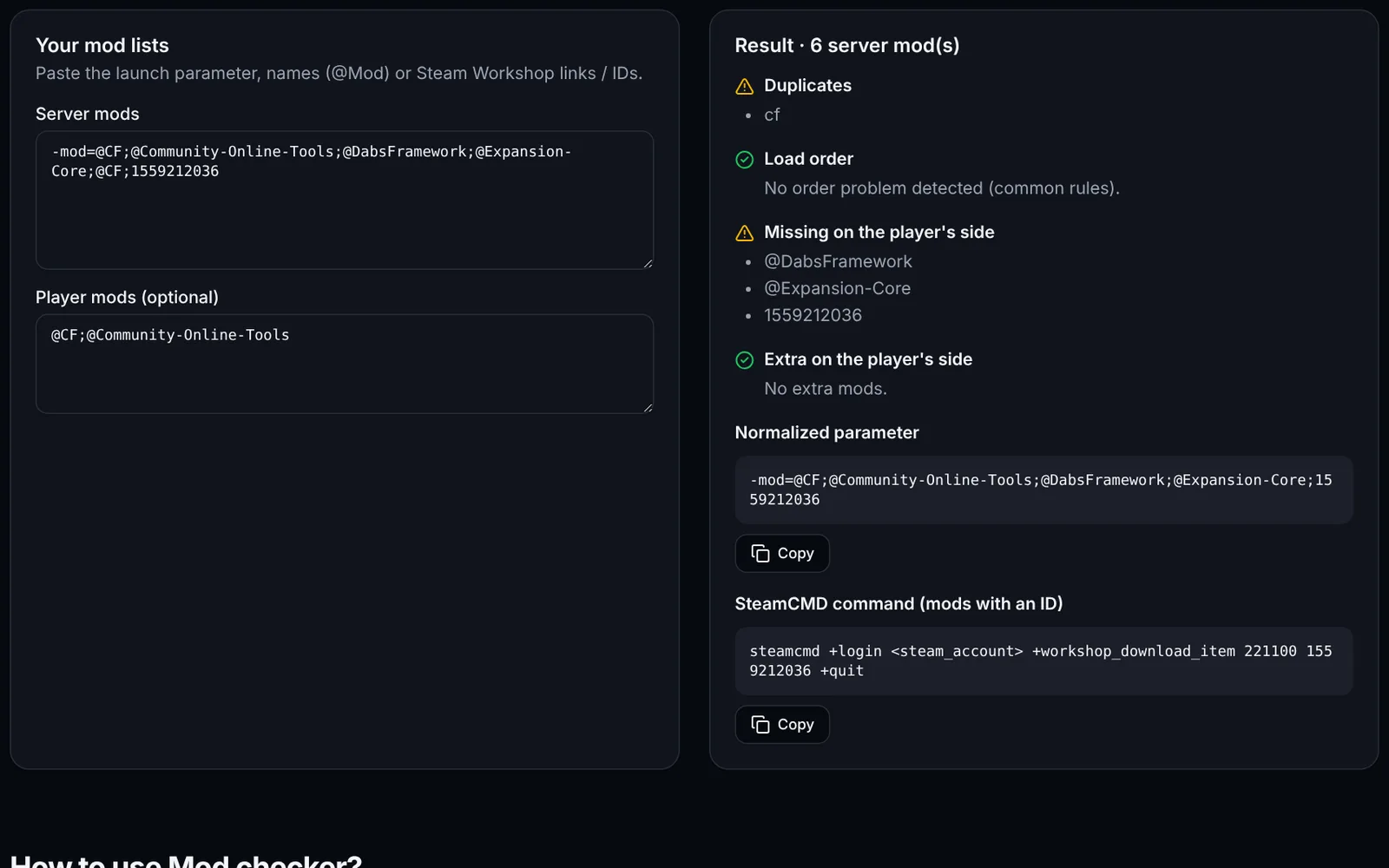
Paste your -mod=@A;@B… parameter (or a list, one Workshop link/ID per line) into “Server mods”.
Optional: paste the affected player's list to detect what is missing or extra.
Read the report: duplicates, load order, server/player differences.
Copy the normalized line (duplicates removed) into your launch script.
For mods given with a Workshop ID, copy the SteamCMD command to download them (appid 221100).
Load-order rules checked
These rules cover the most common cases; always check the mod's Workshop page for its exact dependencies.
- @CF before Community-Online-Tools, VPPAdminTools and Expansion.
- @DabsFramework before the mods that depend on it.
- Expansion-Core before the other Expansion modules.
Frequently asked questions
- Is a Workshop link accepted?
- Yes: the ID is extracted from the link (id= parameter) and used for the SteamCMD command.
- Are my lists kept?
- Yes, only in your browser's localStorage.